Some links in this post are referral or affiliate links (Booth.Events, TalleFlow, SpotMyPhotos, GL.iNet and Amazon). If you sign up or buy through them I may get a credit or a small commission at no extra cost to you. I only link tools I use or recommend to the operators I support.
I spent a night reading every "I'm new," "just starting" and "where do I begin?" post I could find across 15+ of the photo booth Facebook groups I belong to: Photo Booth Business Owners, Photo Booth Network, Photo Booth Community, The Photo Booth Collab, BoothCamp, Photo Booth Owners Hub, the Booth.Events Community, Chit Chat, the roaming and 360 groups, and a handful more (here's the full list of groups). That came to 150+ posts from newer owners and 30+ full comment threads with the replies from people who've been doing this for years.
The same questions come up again and again, and so do the good answers. Here are the 20 that come up most, in roughly the order you'll run into them, with the advice that kept getting repeated by experienced operators. Posters aren't named since most of these groups are private.
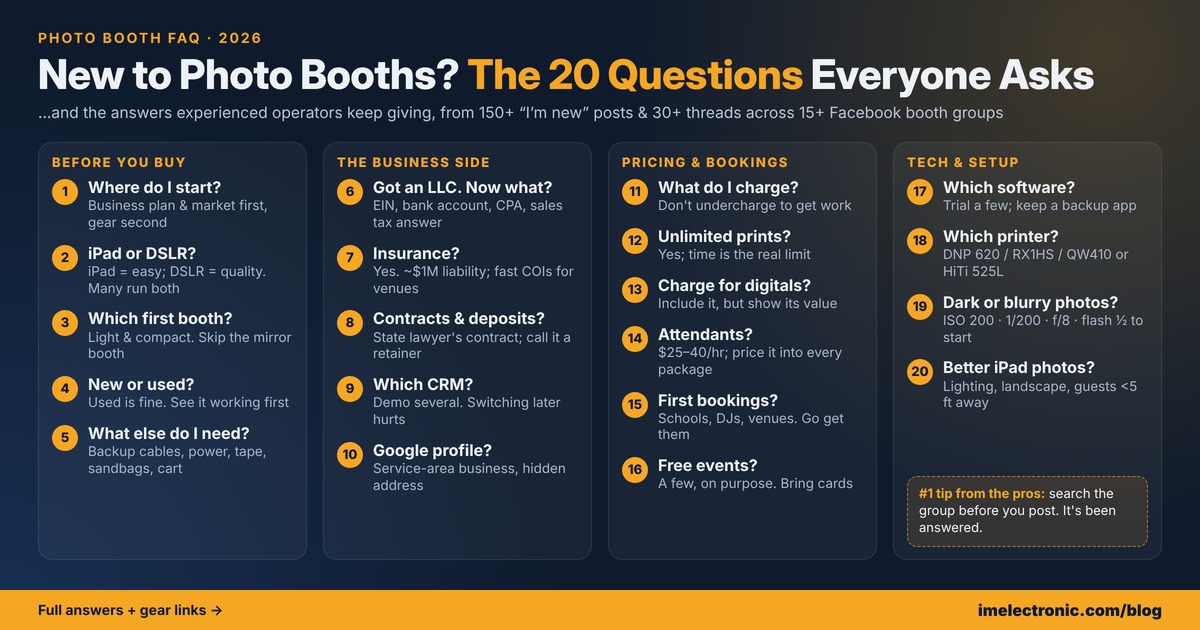
One thing almost every veteran said, in one form or another: use the group search bar before you post. Nearly every question below has been answered dozens of times, and reading those old threads is free research.
Before you buy anything
1. What do I need to do before I spend money?
The most consistent advice in every group was "write a business plan first." Decide who you're selling to (weddings, schools, corporate, birthdays), what you'll offer, and what the going rate is in your area. Several veterans said the most common mistake they see is someone buying a booth and then asking the group what to do with it. Know your market, your budget and your target customer before you pick equipment. More businesses fail from bad business practices than from a lack of bookings.
2. iPad booth or DSLR booth?
This one has been argued "hundreds of times," as one member put it. The consensus:
- iPad is fast, simple and cheaper to start. With good lighting and modern software, a lot of operators say clients never complain. It's great for digital-heavy events and self-serve setups.
- DSLR/mirrorless wins on image quality, especially in prints and enlargements, because of the bigger sensor and real lens, and a flash freezes motion far better than constant light. The trade-off is you have to learn some photography.
Many operators run both and price them differently. One photographer's advice: if you've never owned a DSLR, learn the camera before you buy a DSLR booth. My post on starting an iPad photo booth goes deeper on the iPad route.
3. Which booth should I buy first, and how much should I spend?
Answers ranged from a few hundred dollars for an overseas shell to $10,000+ for a premium booth. The pattern that stood out:
- Don't make a mirror booth your first booth. Mirror owners themselves said it: they're 80–100+ pounds, need a bigger vehicle, struggle in daylight and are hard for a future employee to handle alone.
- Compact, lightweight open-air booths (the "guac" style, Salsa-style iPad shells, Danny Max, Everybooth and similar) got the most "I wish I'd started here" comments.
- Your output quality comes more from your camera, lighting and software than from the shell.
Where I would buy: Danny Max (made in the USA), PicBox, or The NEW Photobooth Shopping Network group on Facebook.
I wrote more about this in Good Photo Booths Aren't Cheap, and Cheap Photo Booths Aren't Good.
4. Should I buy new or used?
Used is a great way in if you inspect it first. People enter and leave this industry all the time, and there's a lot of lightly used gear in the PBSCO Marketplace, the "Used Photo Booths for sale" and "Photo Booth Marketplace" groups and Facebook Marketplace (Salsa 1 units especially, now that the Salsa 2 is out). The advice: see it working before you pay, and buy from a seller you can reach later.
5. What else do I need besides the booth and backdrop?
One reply, from someone who ran a venue for 15 years before buying a booth, was basically a packing list. Combined with the rest of the thread, here's what kept coming up:
- Backups of everything, especially cables ("they are the weakest link"), plus spare printer paper and ink
- A portable power station. Several people named Jackery; I recommend the EcoFlow Delta 3 or newer. Also bring a couple of power banks
- Gaffer tape, sandbags, black extension cords and a cord-cover rug
- A small wireless keyboard and mouse for fixing things on the fly
- One or two small folding tables with tablecloths, and a spot for guests' drinks that isn't your printer
- A folding wagon or dolly so load-in isn't 20 trips
- Floor tape to mark where guests should stand, glass wipes, business cards, and a tip jar with a Venmo QR code (one operator says it adds $50–$200 per event)
- A "photo booth open" sign, and later, extra backdrops in different styles
Running the business
6. I just formed an LLC. Now what?
The checklist from the replies: get your EIN, open a separate business bank account, then sit down with a CPA in your state. Ask about sales tax on rentals, what you can write off and quarterly estimates. One operator pointed out that a drop-off booth with no attendant is often treated as a taxable equipment rental rather than a service in many states, so get your state's answer in writing. Keep every receipt from day one. A newer owner said that was the thing they most wished they'd done.
7. Do I need insurance, and what does it cost?
Yes. Venues will ask for a certificate of insurance (COI), often with the venue named on it, and you want an agent who can turn those around quickly. Several US operators said a $1 million general liability policy runs around $20 a month. Names that came up: Zensurance (popular in Canada), Full Frame, Next, Front Row, State Farm and Desjardins. Call around and get quotes.
8. What should my contract say, and deposit or retainer?
Two points came up over and over:
- Get your contract from a lawyer in your state. Contracts are state-specific, and "downloaded off the internet does not cut it."
- Call it a retainer, not a deposit. Several operators warned that a "non-refundable deposit" may still be treated as refundable, while a retainer is the term to use for money that holds the date. Run your wording past your lawyer.
Common terms people shared: a signed contract plus a retainer (anywhere from a flat $100 to 50%) to lock the date, the balance due 10–14 days before the event, and clauses for cancellations, damage, outdoor events and kids under 12 needing an adult nearby.
9. What should I use for bookings, contracts and payments?
The question "what CRM do you use?" gets dozens of answers. One CRM founder in the thread gave the best advice: talk to several, think about what you'll need as you grow, because "CRMs are no joke and aren't fun to switch." Names that came up most were Check Cherry, HoneyBook, BoothBook / Photo Booth CRM and TalleFlow. One owner on a zero budget runs JotForm for inquiries and contracts, Wave for invoices and Trello for leads, all tied together.
I run all of my booth bookings, contracts and invoices in TalleFlow (my referral link). Here's how I have it set up.
10. Do I need to set up a Google Business Profile, and why won't it verify?
One owner who booked 46 events in 28 days from organic search put it bluntly: no Google Business Profile looks amateur, and reviews matter more than anything you say about yourself. Tips from the verification thread:
- Set it up as a service-area business and hide your home address. Avoid virtual addresses.
- Expect video verification on your phone. Show your business license or LLC papers, equipment, business cards, a business email on your own domain and the back end of your website, with location turned on.
- The "Photo booth" category may require a public address. Several operators use "Photographer" or "Party equipment rental service" as the primary category instead and still rank for "photo booth rental" searches.
Pricing and packages
11. What should I charge?
This was the single most-asked question, and the honest answer is "it depends on your market and what you include." Real numbers people shared:
- iPad, digital only: guesses of $150–$250 an hour; one operator charges $450 for two hours with an attendant, backdrop, props and travel in a small town, and $695 for two hours with prints
- Drop-off, no attendant or prints: $499 for "up to 5 hours" from one operator; $850 for 6 hours from another
- Premium markets: $975 for three hours of digital only
- Booth added to a DJ package: $600 for four hours
The most-liked replies all said the same thing: don't undercharge to get work. One owner charging $100/hour asked why nobody booked her, and the top answer was "for those prices, I wouldn't hire you." Another veteran: "You can't discount your way into creating demand." Price on your costs, your time and the experience you deliver, then be confident selling it.
12. Unlimited prints or a print limit?
Most experienced operators offer "unlimited" because the real limit is time: you can only get so many sessions through in three hours. One operator's biggest events topped out around 250 prints, roughly $50 in media at 14–17 cents a print, which is baked into the price. Popular ways to keep it fair:
- "Everyone in the photo gets a print" instead of advertising unlimited
- Unlimited sessions, 2 prints per session
- Write "per session" in the contract, and charge for reprints after the event
13. Should I charge extra for the digital gallery?
Most people include it, and many put a dollar value on it in the quote so the client sees what they're getting ("digital gallery, a $100 value, included"). I quote built-in sharing as included, and sell an extended gallery as an add-on. For private, searchable galleries, I use SpotMyPhotos (partner discount link). Here's how I use it.
14. Do I need an attendant, and what do they get paid?
An attendant does everything you'd do: set up, tear down, start sessions, keep the prop table neat, fix printer jams and keep drinks off your gear. Pay quoted in the threads was $25–$40 an hour, plus travel for long drives. A good point from one owner: don't add the attendant as a separate line. Set your rate so it covers hired help whether you work the event or someone else does.
Getting booked
15. How do I get my first bookings?
The top reply in one thread was "do not wait for people to come book." The repeated suggestions:
- Schools and PTAs. One operator says they bring him about 30 events a year.
- Partner with DJs, bands, planners, venues and rental companies that don't have a booth. One operator became the booth provider for a local amusement rental company.
- Network in person (Rotary, chamber events) and post in local groups where it's allowed.
- Build a website that says who you are, what you offer, where you serve and what to do next, then work on SEO and reviews.
- Cold emails to local businesses before the holiday party season.
One owner shared real numbers: about 20,000 search impressions in 28 days, 1,379 site visits, 90 inquiries and 46 bookings, all organic.
16. Should I do free events?
Mostly yes, a few, done strategically. Owners booked paid events from a cousin's baby shower, a friend's party, a charity fundraiser and their kids' school events. The free events give you photos for your website and social media and a live test of your setup. Two cautions: free events don't automatically turn into paying clients, and don't stay "the free booth" for long. Always bring business cards. If you're doing vendor events, see my post on using your booth's survey instead of selling prints.
Tech and setup
17. Which photo booth software should I use?
The most-named apps in the "what do you use?" threads: LumaBooth (cheap, easy, great starter for iPad), Booth.Events, Snappic, Touchpix, dslrBooth, Darkroom Booth, Fiesta (for Salsa booths) and Breeze. Several operators said software makes a visible difference in print quality: more than one switched from Fiesta to Booth.Events and said their prints improved "tremendously." Most apps have trials, so test a couple, and keep a second app installed as a backup.
I run all my booths on Booth.Events (my referral link), on iPad and on Mac with a DSLR. Here's how I use it, and if you ever need a manual, here's where to find the docs for every booth app.
18. Which printer should I buy?
DNP was the near-unanimous answer. One longtime printer expert's comparison: the DS620A is "the Lexus" (fastest, best quality, most media options), the RX1HS is "the Highlander" (slower, holds more media), and the QW410 is "the Corolla" (smallest and cheapest, holds the least, and won't cut 2x6 strips without special media). Note that the RX1HS is being replaced by the RX2. The HiTi P525L also got strong votes, especially with LumaBooth. Store your printer flat, never on its side. More in this printer advice roundup and my DNP printer tips.
For printing from an iPad, many apps can now print straight to a DNP. Otherwise you'll use a print server: a cheap Windows laptop or tablet works (a Chromebook won't), a DNP WCM, or an AirCastPro. A good travel router makes all of this more reliable. I use and recommend GL.iNet routers (code Steven10 takes 10% off at the GL.iNet store), covered in my travel router guide.
19. Why are my photos dark or blurry?
The two fixes that solved the most problems:
- Dark live preview on a Canon with LumaBooth (or similar): turn off Exposure simulation in the camera menu. The photos were fine, the preview just looked dark. The original poster said it fixed it instantly.
- A starting point for flash exposure: flash at 1/2 power, ISO 200, 1/200 shutter, f/8, white balance on flash. Too dark? More flash power, then higher ISO or f/5.6. Too bright? The reverse. Leave the shutter alone, and set your exposure by the prints, not your screen.
Blurry shots in a mirror booth are often focus or camera position: check where the lens sits behind the glass before blaming the camera. And as a few people bluntly put it, learn the exposure triangle and read your camera manual.
20. How do I make iPad photos look better?
Almost every reply said the same thing: lighting. After that:
- Guests under about 5 feet from the iPad, and one to two feet in front of the backdrop
- Booth about 4–5 feet from the backdrop
- Shoot landscape on newer iPads: the front cameras are wide-angle and look better that way
- Stick to close-up and waist-up shots; full-length means more distance and more grain
- Light from above the iPad, with lights on the sides of the backdrop if needed
- Try more than one app; some produce noticeably crisper images
Bonus: things nobody tells you until your first event
- Props will disappear. Price it in, buy sturdy props instead of dollar-store ones, keep the table tidy and put them away if guests get rough. One owner had her husband stand at the prop table, which helped a lot.
- Backdrops: 8x8 is the most common pillowcase size; a 7.6-foot backdrop fits under 8-foot ceilings. Buy from a supplier you can get service from.
- Weddings and school events are the wildest. Set expectations about kids in your terms.
- Have a backup plan for everything, including who covers the event if you can't.
The short version
Do your homework, write a plan, get insured and get a real contract. Start with a light, simple booth you can handle alone. Learn your camera and lighting. Price for profit, include a lot of value, and go find your clients instead of waiting for them. And when you get stuck, search the groups first, because someone has almost certainly asked it before.
If you're in Iowa, come join the Iowa PhotoBooth Network, a group for Iowa operators to share referrals, white-label work and advice.
As an Amazon Associate I earn from qualifying purchases.
Need a hand with your photo booth? Get a real technician in your corner. I work with Photo Booth Support, which offers 24/7 technical support for booth operators by phone, chat and remote access for software, printer and camera issues. Plans are per booth and month-to-month: Emergency covers live-event emergencies around the clock, and Premium adds scheduled non-emergency help and training on your software. There are also setup and training appointments.
Want one-on-one help with a custom setup? I also do custom consulting for photo booth operators.