A few days ago I built a free status page that checks whether the big photo booth apps are up. That answers "is it them or is it me?" But it doesn't tell me anything about my booths. Is the iPad charged? Did the printer throw an error? How much paper did Saturday's event actually burn through?
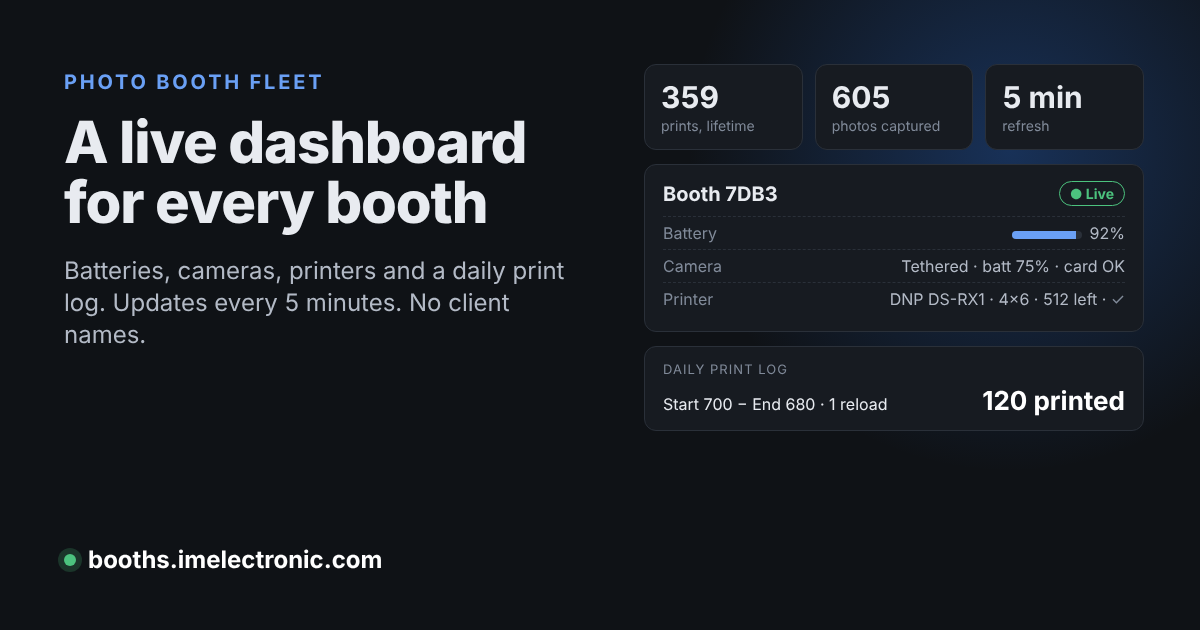
So I built a second page for my own fleet: booths.imelectronic.com. It's public, it updates every 5 minutes, and it doesn't give away a single client name.
The prompt I used
I built this with Claude (the AI assistant), which can talk to my Booth.Events account and my web hosting. Here's exactly what I asked for:
"Make a status page at booths.imelectronic.com that lists all the data possible from my BoothEvents account and updates every 5 minutes with all my devices listed, print counts, camera info, battery levels, everything possible but succinct. Anonymize any identifying information so this can be public facing. Track the # of prints per booth and do a start of day vs end of day equation for a daily print log."
That was it. It pulled my data, wrote the code, set up the subdomain and the 5-minute schedule on my host, and checked the live page for anything that could identify a client.
What the page shows
- Every booth device: iPad or Mac, OS and app version, whether it's live right now, battery level and charging, and free storage.
- Camera: built-in or tethered, plus camera battery, card space and shots left when a DSLR or mirrorless camera is connected.
- Printers: model, how it's connected, paper size, prints left and any error, like out of paper or a ribbon problem.
- Queued uploads and shares still waiting on the device. This is handy at venues with bad Wi-Fi.
- Lifetime totals: prints, photos, guest sessions, AI creations, shares, texts and emails sent, and gallery visits.
- Prints by printer model, captures by type, a 30-day gallery visitor chart, and any alerts from the last 7 days.
I can pull it up on my phone while I'm loading the car and know which iPad needs a charger before I leave the house.
The daily print log: start of day vs end of day
This is the part I actually care about as an operator. Dye-sub printers like the DNP DS-RX1 report how many prints are left on the loaded media. The page records that number at the first reading of each day and at the last one (Central time). Then it does the math:
Start of day − End of day = prints used
That simple equation breaks the moment you reload paper mid-event. If you start at 700, drop to 600, swap in a fresh roll and end at 680, start minus end says you printed 20. You really printed 120. So the log also adds up every drop between the 5-minute readings and counts the reloads separately. You get both numbers side by side: the simple start-vs-end equation and the real "printed" total.
Each day also shows Booth.Events' own print counter as a cross-check. It works even for printers that don't report prints left. When the two numbers disagree, that's my cue to look for reprints, test prints or a misfeed.
Why bother? Media is one of the real costs of running a booth. Knowing that a 4-hour wedding used 140 prints and a school event used 300 makes quoting, packing paper and pricing a lot less of a guess.
Public, but anonymous
My Booth.Events account is full of things that should never be on a public web page: couples' names, venues, school names, contact info and guest photos. The page shows none of it.
- Devices show up as random tags like "Booth 7DB3", never by their real names.
- Event names, clients, notes, AI prompt names and account IDs never leave the server.
- Printer names are cut down to the model. This one surprised me. Some of my printer names included the hostname of the Raspberry Pi print server and the name of a MacBook, plus serial numbers. If you ever share screenshots of your printer setup, check what your printer names say about you.
How it works (the short version)
- A read-only Booth.Events API key, created under Account → API Access. Read-only means the page can look but can never change an event or a device.
- A small PHP script on my regular cPanel hosting runs every 5 minutes. It asks Booth.Events for my devices and alerts, removes anything identifying, and saves a snapshot. The heavier stats, like lifetime totals and prints by model, refresh every 30 minutes so I'm not hammering the API.
- The API key lives in a config file outside the public website folder, so nobody can load it in a browser.
- The page itself is one plain HTML file that reads the snapshot. No WordPress, no plugins, and it barely touches the server.
The device data comes from the Booth.Events app itself. While the app is open it reports battery, storage, printer and camera status about every 5 minutes. A booth that's packed away just shows when it was last seen. If you run several iPads, it pairs well with a good naming and lockdown setup.
Want one for your booths?
If you run your booths on Booth.Events and your plan includes API access, this is very doable. I've written before about how I use Booth.Events to run my photo booths. This dashboard is the next step. If you'd rather not build it yourself, I do custom setups like this for other booth operators. Reach out through imelectronic.com.
Take a look at the live page: booths.imelectronic.com
Links to Booth.Events in this post are my referral link. If you sign up through it I may get a referral reward, at no extra cost to you.